Moar Panda: Is a Firehose of Snowflakes a Nor’easter?

Kellan in his blog post over here: Is a Firehose of Snowflakes a Nor’easter? correctly points that that I may have been slightly cagey about the awesomeness of what we actually put out yesterday, by saying …

“But because the documentation is quirky, I think people missed the significance. These are Flickr real time data APIs.”

My excuse is that’s my natural instinct to sneak new features past the lawyers, by dressing them up in a non-serious fashion :)

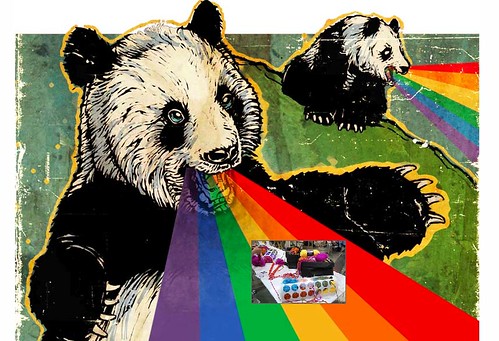
But in reality, this is just an excuse to post the following photo …

Magic Panda Bus

… see there I go again. Offsetting the important with light humor, go read Kellan’s post now for he is smart and knows what he’s talking about.

Now stop trying to get on explore & enjoy yourself

Photo by Las Tonterias points out

Panda Tuesday; The History of the Panda, New APIs, Explore and You

The New APIs

I’ll cut straight to the chase on this one, we’ve just launched two new API methods;

flickr.panda.getPhotos
flickr.panda.getList

The first call (flickr.panda.getPhotos) returns you a list of photos that the mystical Flickr Pandas are currently interested in, in the following format …

<photos interval="60000" lastupdate="1235765058272" total="120" panda="ling ling">
    <photo title="Shorebirds at Pillar Point" id="3313428913" secret="2cd3cb44cb"
        server="3609" farm="4" owner="72442527@N00" ownername="Pat Ulrich"/>
    <photo title="Battle of the sky" id="3313713993" secret="3f7f51500f"
        server="3382" farm="4" owner="10459691@N05" ownername="Sven Ericsson"/>
    <!-- and so on -->
</photos>

When calling this API method please ensure that your code uses the lastupdate and interval attributes to determine when to request new photos. lastupdate is a Unix timestamp indicating when the list of photos was generated and interval is the number of seconds to wait before polling the Flickr API again.

The second call (flickr.panda.getList) tells you which of the Mystical Flickr Pandas are around to request photos from.

Ling Ling and Hsing Hsing both return photos they are currently interested in, both have slightly different tastes in photos depending on their mood. The (currently) third Panda Wang Wang returns photos that have recently been geotagged, not quite realtime but close.

Important! No-one fully understands the whims and fancies of the Pandas at any moment in time, these APIs give you a direct dump of what they are looking at (filtered for safe and public photos only) at this very moment. We cannot promise that this will not include ladies (or men) in bikinis, or possibly even ladies not in bikinis. You should keep this in mind while planning for your target audience, I’ll touch on this a little bit more in the Implementation Hints section.

You Wanted the Best, You Got the Best

Philosophy

We’re always toying around with different ways to find and surface “interesting” photos. One method that people are generally familiar with is the Explore page, of which there’s always a lot of discussion. A good starting place for more Explore information is here with more general discussion in the Secrets Of Explore group.

But behind Explore is an amount of “Secret Sauce” a lot of which focuses on activity around a media object. The Explore page is generally a daily experience, although things often pop in and out during the day.

What we are doing with the Pandas is exposing a more real time experience, letting them each focus on various aspects of that activity, the first two Ling Ling and Hsing Hsing are fairly introspective and have different views of Flickr, but both focus on what they’ve noticed going on recently. The third Wang Wang is more a panda of the world and concentrates solely on geotagging. If you wanted to show photos being geotagged nearly as they happen, Wang Wang is the way to go.

From a numbers point of view, Explore shows 500 photos from the last 7 days … a Panda can get through around 150,000 photos per day.

A couple of caveats; Just because a Panda notices a photo, doesn’t mean that photo will make it into Explore, or even be destined to be considered by the Magic Donkey for Explore. Conversely, because a photo has made it into Explore doesn’t necessarily mean that a Panda will have noticed it. Also, because of the complexity and amount of stuff going on, no-one really knows exactly what Ling Ling and Hsing Hsing will find interesting, but that won’t stop us from tweaking the underlining code now and then.

Also, you may have noticed that this is one of the less serious APIs, it’s both experimental and there to hopefully encourage fun and play. Please respect the Pandas and don’t abuse them, help us protect this endangered species and keep them alive.

Implementation Hints

So, why are we doing all this messing around with “Pandas”?

Well, mainly because we want to give developers another stream of photos with which to play with. For example you could build your own Flickr Zeitgeist Badge or slideshow or tool to just show stuff that’s going on over at Flickr.

We built this …

Flickr Panda!

… (many people wished we hadn’t) … the Rainbow Vomiting Panda of Awesomeness as an experiment (which used Ling Ling fwiw). Since then we’ve been tweaking the backend, and now finally released the API so you can all have a go.

It’s a stream of, on average, more interesting photos then you’d generally get from polling Everyone’s photos. The quality is pretty good, the best thing to do is watch The Panda for a while and figure out if a) you want to build something with a live stream of photos b) you can build something more better than a vomiting panda (which lets face it, it pretty hard to top!).

This is what I learnt while building it, it may help you too …

When you get a packet of photos back from a panda, its around 60 seconds worth of stuff that the Panda found interesting. The packet is sorted by what the Panda found most interesting in that timeframe to least. Because people can often find ladies in bikinis interesting (for some reason) there can sometimes be some activity around ladies in bikinis that the Pandas may pick-up on.

However, Pandas tend not to find ladies in bikinis that interesting (which may have something to do with why they’re in such peril) and when those photos appear they tend to happen in lower half of the packet of photos.

So in the case of the Vomiting Panda above, I just threw away the second half of each packet, rather than go through all of the photos before asking for the next packet. I found this to be a good thing to do anyway, even though there’s always a lot of amazing stuff going on on Flickr the tail end of some packet wasn’t always quite as amazing as I wanted. You may want to do things differently, but that’s just what I found while working with the APIs.

Send us stuff

Anyway, on that note, at some point I’ll try to do a round up of stuff people have built on these APIs. If you want to post what you build to the Flickr Hacks group and/or FlickrMail me I’ll start to build up a list and take it from there.

Photos by ohad* and psd.

Videos in the Flickr API: Part Deux

We hope it’s obvious that long photos are taken extremely seriously here at FlickrHQ. To that end, it’s important that videos be first class citizens in our api. And with today’s launch of video for free users and the HD output, we have some important new api changes to share with you. So if you’re an uploader developer, a mobile application developer, or you make those things that are changing the way that people consume their tv and other media (nudge-nudge Boxee), take a look at these new additions to the api and make our long photos feel right at home in your apps.

With the addition of our HD output, all videos are now transcoded into 2 or 3 MP4s. Since these are in a widely-supported format, we thought it would be interesting to make them available to third-party developers. flickr.photos.getSizes will give you semi-permanent urls to the 700k site output, the mobile-optimized output, the 2mbps HD output (if available), and the original video (if the call is authenticated by the video owner and the owner is a pro member). For example:

<rsp stat="ok">
<sizes canblog="1" canprint="1" candownload="1">
<size label="Square" width="75" height="75" source="http://farm4.static.flickr.com/3436/3232057393_815b1c5d26_s.jpg" url="http://www.flickr.com/photos/mylesdgrant/3232057393/sizes/sq/" media="photo"/>
<size label="Thumbnail" width="100" height="56" source="http://farm4.static.flickr.com/3436/3232057393_815b1c5d26_t.jpg" url="http://www.flickr.com/photos/mylesdgrant/3232057393/sizes/t/" media="photo"/>
<size label="Small" width="240" height="135" source="http://farm4.static.flickr.com/3436/3232057393_815b1c5d26_m.jpg" url="http://www.flickr.com/photos/mylesdgrant/3232057393/sizes/s/" media="photo"/>
<size label="Medium" width="500" height="281" source="http://farm4.static.flickr.com/3436/3232057393_815b1c5d26.jpg" url="http://www.flickr.com/photos/mylesdgrant/3232057393/sizes/m/" media="photo"/>
<size label="Original" width="1280" height="720" source="http://farm4.static.flickr.com/3436/3232057393_204af3bcff_o.jpg" url="http://www.flickr.com/photos/mylesdgrant/3232057393/sizes/o/" media="photo"/>
<size label="Video Player" width="640" height="360" source="http://www.flickr.com/apps/video/stewart.swf?v=1233362721&photo_id=3232057393&photo_secret=815b1c5d26" url="http://www.flickr.com/photos/mylesdgrant/3232057393/" media="video"/>
<size label="Site MP4" width="640" height="360" source="http://www.flickr.com/photos/mylesdgrant/3232057393/play/site/815b1c5d26/" url="http://www.flickr.com/photos/mylesdgrant/3232057393/" media="video"/>
<size label="Mobile MP4" width="480" height="360" source="http://www.flickr.com/photos/mylesdgrant/3232057393/play/mobile/815b1c5d26/" url="http://www.flickr.com/photos/mylesdgrant/3232057393/" media="video"/>
<size label="HD MP4" width="1280" height="720" source="http://www.flickr.com/photos/mylesdgrant/3232057393/play/hd/815b1c5d26/" url="http://www.flickr.com/photos/mylesdgrant/3232057393/" media="video"/>
<size label="Video Original" width="1280" height="720" source="http://www.flickr.com/photos/mylesdgrant/3232057393/play/orig/123fakest/" url="http://www.flickr.com/photos/mylesdgrant/3232057393/" media="video"/>
</sizes>
</rsp>

Use this if you’re lazy. If you’re not lazy and want to be one of the cool kids, you can construct the urls to these outputs yourself, assuming you have the nsid or custom url of the owner, the video id, and the secret (or original secret). Requesting the HD output for a video that doesn’t have it (because it’s less than 720 pixels high, or the owner is a free member), will deliver a 404. An example url:

http://www.flickr.com/photos/{user-id|custom-url}/{photo-id}/play/{site|mobile|hd|orig}/{secret|originalsecret}/

If you’re developing uploading tools for free users, flickr.people.getUploadStatus has new attributes to determine whether a user is allowed to upload any more videos or not. If the user is a free user, the output of this method will now look something like this:

<rsp stat="ok">
<user id="88251462@N00" ispro="0">
<username>Dev Myles</username>
<bandwidth max="107373568" used="0" maxbytes="104857600" usedbytes="0" remainingbytes="104857600" maxkb="104857" usedkb="0" remainingkb="104857" unlimited="0"/>
<filesize max="10485760" maxbytes="10485760" maxkb="10240" maxmb="10"/>
<sets created="7" remaining="lots"/>
<videosize maxbytes="157286400" maxkb="153600" maxmb="150"/>
<videos uploaded="0" remaining="2"/>
</user>
</rsp>

Note the new <videos> element in the response, which will let you know how many more videos this user can upload this month.

And as always, if you feel like we’re missing something, please let us know.

YUI Blog: Improving The Flickr Upload Exprience With YUI Uploader

water pipe

Visual analogy of simultaneous file uploading. Also, internet/pipe joke goes here.

As a site which has many nifty JavaScript-driven features, Flickr makes good use of the Yahoo! User Interface library for much of its JavaScript DOM, Event handling and Ajax functionality.

One of the fancier widgets we’ve implemented is a flashy browser-based Web Uploadr which uses the YUI Uploader component (a combination of JavaScript and Flash) which allows for faster batch uploads, progress reporting, a nicer UI and overall improved user experience.

Head over to the YUI Blog and check out how Flickr uses YUI Uploader to provide a faster, shinier upload experience.

Found in space

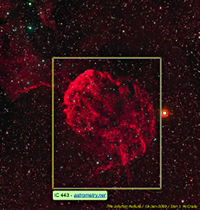
Image of the Jellyfish Nebula, annotated by Astrometry.net robot
The Jellyfish Nebula, by DJMcCrady,
with annotation by Astrometry.net

A robot intelligence has invaded Flickr. The “blind astrometry server” is a program which monitors the Astrometry group on Flickr, looking for new photos of the night sky. It then analyzes each photo, and from the unique star positions shown it figures out what part of the sky was photographed and what interesting planets, galaxies or nebulae are contained within. Not only does the photographer get a high-quality description of what’s in their photo, but the main Astrometry.net project gets a new image to add to its storehouse of knowledge.

Needless to say this is one of the coolest uses of Flickr groups and the API that we’ve ever seen. I recently discussed the project with team member Christopher Stumm, since he was the one who had the idea to hook it into Flickr.

With Astrometry.net, you’re distributing the work of cataloguing the sky to amateurs. Are we still in an age where the average person can make contributions to astronomical science?

Christopher Stumm

Definitely. There’s a large number of excellent amateur setups out there, and they discover supernovae and minor planets regularly. Although science-grade data is generated, it can be difficult to use because it’s hard to find, and there’s typically no useful meta-data. We’re hoping to help with that problem.

The catalog we use to solve images was put together from surveys during the last 50 years – that’s a long time! We believe that if the information generated by the amateur astronomer community is harnessed we could build an open-source sky survey much faster.

On top of that, we would be able see what areas of the sky have interesting activity. Right now we’re using images from around the web to calculate the path comet Holmes took through the sky.

Your scale and rotation invariant hashing algorithm is fiendishly clever. Where does it come from?

It’s an adaptation of an old idea in computer vision — “geometric hashing” — to astronomical images. It was originally created by researchers who were trying to model associative memory; “that shape reminds me of something I’ve seen before”. The idea works great for astronomical pictures, because stars are easy to locate exactly. By adding a fast search method for similar-shaped arrangements of stars, and a check that eliminates coincidental matches, we’re able to match an image against the whole sky, usually in a matter of seconds.

Actually, sometimes we still do get false matches, but it turns out that that’s almost always because of some problem in either the image or our reference. These are places where we could use many amateur astronomer images to patch our reference catalog.

Have there been any surprises about the data you’ve received, or the response you’ve gotten? Any discoveries?

One thing that has surprised me has been the amount of positive feedback we’ve gotten. The project was covered on a few sites including kottke.org, Reddit, and O’Reilly’s Make magazine. After reading about it people had to test it out, so we saw pictures from people’s back yards, some people tried to fool the system by inputting hand-drawn images, and one person even passed in a screen shot from an iPhone application which shows you the night sky.

The submissions range from amazingly high quality to images where someone just took their camera and pointed it at the night sky with some trees and a house included too. I was surprised how robust our solver was to some of the obstructions we find in the images.

Overall I think it shows people are curious about the sky, but it can be pretty very overwhelming due to its sheer size. Hopefully we help make it a little more approachable by showing people what’s in their picture.

Why Flickr? How has the experience been?

I was a Flickr user, liked the service, and believed it offered much of what we were looking for at the time. Flickr had a huge user base which meant it was familiar and would be easy for users to upload images, submit them to our group, and offered basically unlimited scalability.

The image annotations offered by Flickr were really the icing on the cake and made the whole feature much more compelling, especially to people who aren’t astronomy buffs such as myself. On top of that the API made it easy to hook into. I can’t really complain about anything so far with the whole experience, it’s been a lot of fun.

Mise en hack

Our very own waferbaby has been rocking it out with his series, “The Setup”, on hacker mise en place. (and by hacker we mean in every sense of the word, from _why the lucky stiff, to YACHT, to David Lanham)

And if you missed it, waferbaby had the Flickr dev team do our own little version of the “The Setup” last May, published for posterity at Trickr, or Humanising the Developers (Part 1) and (Part 2)

The Setup, check it out.

[changelog] Delete Tag Cross Things inspired by Delete Tag Cross Things

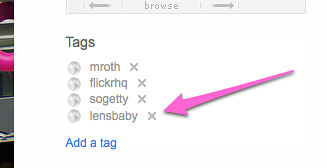
Proving that no change is too small for [changelog] (and that I need to keep on top of them a little more) as spotted over in the Help Forum: “tags look different” thread, a change in the deleting “x” on Tags.

Dunstan and Ross snuck^H^H^H^H^H rolled out the change out on Friday and it looks something like this …

delete tag

Worth noting that Dunstan goes on to sayThey all might end up a bit smaller, and a bit lighter. We’ll just live with them for a little bit and see how they go.” … at which point I’ll post another changelog or not, depending on what happens :)

As no change is without a protest group feel free to register your outrage over in the Flickreenos Against **New Xs** Group. Or at least until the next change comes out, at which point the protest group will move onto that.

5 Questions for David Wilkinson

Me, by Sue

On the last 5 Questions I posted, I ended with “Thank you, Gustavo. Next up (unless Kellan gets in first!) dopiaza.” Well Kellan did indeed get in first, with both Jonnie Hallman and Fraser Speirs. So now, without any more procrastination, I present David Wilkinson, “Utata’s architect” as described by Gustavo …

1. What are you currently building that integrates with Flickr, or a past favorite that you think is cool, neat, popular and worth telling folks about? Or both.

David: I guess one of the most visible things that I’ve built so far is the Utata web site (http://www.utata.org/) and the tools that surround that. Utata, the Flickr group, is a pretty lively community, with over 16,000 members and a pool of over 270,000 photos. In Utata, we like to encourage people to participate, and our web site expands on the group pool and discussion threads on Flickr with a variety of projects for members to participate in, blogs that feature photos picked from the pool, and a wide variety of articles, notices and links. The key thing we’ve tried to do in Utata is to ensure that participation is simple and straightforward. Anyone can come along and join in – the only requirement is that you have a Flickr account.

Utata

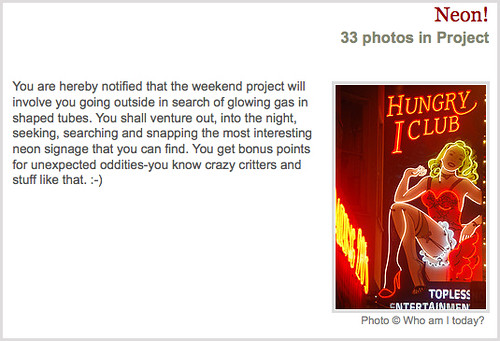
Some of the most popular parts of Utata are undoubtedly the group projects – there are typically about three or four group projects in progress at any time, each with their own theme. To take part in a project, all members need to do is tag their photo with the specified project tag and it will then automatically get included in the project pages on the Utata web site. We do all of the hard work of keeping track of which photos are in which project, and presenting the project pages to the world. It is participation made easy – “tag and run”.

To make all that happen, there’s a whole pile of stuff in place behind the scenes. We have a sizeable set of PHP classes, a bunch of perl scripts and a MySQL database, that between them keep track of who all the Utata members are and which photos have been added to which project. The end result of all of this is a pretty smooth and largely automated system. A bunch of cron scripts keep the project database up to date and we have a private administration site that allows Utata administrators to quickly and easily perform a wide variety of tasks: they can set up and publish new projects, create polls, update member details, post new blog entries and so on. We also have HAL, the UtataBot, who keeps a watchful eye on the group pool, making sure that members abide by the rules and that we don’t just become a general dumping ground [RevDanCatt: here’s another pool cleaning bot, hipbot]. There are also the Utata badges that show off the latest contributions to the group pool. Actually, it’s only now, as I sit and write this list, that I realise just how much code there is sitting there on the Utata servers.
Project

One of the key parts of the system is the list of projects and their entries. Utata is a popular site, and it’s clearly not feasible to go back to Flickr to search for project entries each time a page is viewed, so a good deal of the code that runs Utata is devoted to maintaining our local copy of that data – keeping the cached data up to date and retrieving less commonly used elements from Flickr on demand as various pages are viewed. Given the number of projects held on Utata, and the size of the membership, it’s important to make efficient use of the cache, and I’ve tried a number of different strategies to minimise the number of API calls required. The biggest thorn in my side here is the limitation in flickr.photos.search that you can only ever get back the first 4000 photos for a tag-based search. I have some work-arounds to get around that, but if that limitation was ever increased I could make the whole thing far more efficient.

An interesting, but little known fact about Utata, is that it has its own API, which if you were to take a close look at, might well look rather familiar – it uses the Flickr API as its role model. There are only has a limited number of methods right now, but the framework allows more to be added quite easily. The idea behind the API is to enable other interesting applications to be written. There are only a few of these external applications in existence at the moment – there’s a stand-alone project browser, which I don’t think anyone other than me uses. A more interesting one is the Utatascreensaver, which cycles through photos from the Utata project of your choice.

As well as Utata, I dabble with a variety of other projects. The main thing I’m working on right now is a revamp of my Set Manager (http://www.dopiaza.org/flickr/setmgr/). One of the first comments I ever posted to Flickr Ideas was a request for Smart Sets – sets that could dynamically update themselves. You can think of them as the photographic equivalent of SmartPlaylists in iTunes. At the time, I was just starting to experiment with the Flickr API, so I decided to try my hand at building an application to create sets automatically. It’s not especially complicated, it’s really just a simple wrapper around flickr.photos.search, but it has certainly struck a chord with people, with currently over 25,000 authenticated users. It hasn’t changed very much since it was first written, so I figured it was time to give it something of an overhaul.
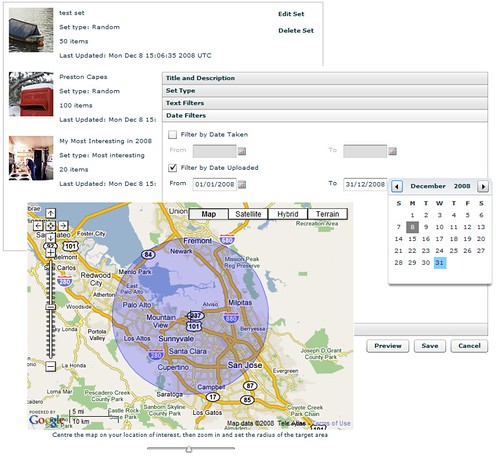
Set Manager

I’ve recently been playing around with Adobe’s Flex framework and decided that revamping the set manager would give me a good excuse to get to learn more about Flex and understand how it all hangs together – and so Version 2 of the set manager is now well under way. This new version allows you to not only build sets based on tags, interestingness, date and so on, it also allows you build sets based around location – the places API provides a very easy way to get access to all of the photos in a given location. For a more visual approach to set building, I’ve also hooked in Google Maps (sorry, Yahoo!) using their rather nifty Flash component to allow areas of interest to be easily chosen. This new Set Manager also piggy-backs on some of the work I did on Utata – it now exposes an API, built using the same framework as the Utata API, to allow the Flex application to communicate with the server.

Most of the Set Manager revamp has now been completed, and few Flickr stalwarts have been helping test it all out. The plan is to get this new version up and running by the end of the year – all I need is a little more spare time to finish things off…

2. What are the best tricks or tips you’ve learned working with the Flickr API?

David: Gustavo sneaked in ahead of me here and got in first with some of the best answers, but the main one is worth repeating – cache your data. Every API call you make can add several seconds on to the run time of your application or the load time of your web page, so you should really think carefully about whether each API call is necessary. If you think you’re going to need that data again in the near future, store it away somewhere – in a database, in the user’s session, anywhere. A good caching strategy can make the difference between a snappy responsive web site and a painfully slow, treacle-laden disaster.

One thing that seems to catch out a lot of people is the 4000 item limit to searches, which seems to be poorly documented (i.e., not at all). If you’re not aware of this limitation, it can suddenly rear it’s ugly head when you’re least expecting it – and usually when it’s least convenient. I remember the first time a Utata tag exceeded 4000 photos (the utatafeature tag currently returns over 16000 photos) and that certainly caused a few headaches. The only solution to this problem seems to be to construct your searches so that they’re sure to return less than 4000 matches. For the Utata tag searches, I ended up breaking the search down into a set of searches using smaller date ranges and aggregated the results. It’s not perfect, but it seems to be holding up.

And if you build an application or tool and release it out into the world, be prepared for an endless stream of emails from people who want it to do something just a little bit different from what it does right now…

3. As a Flickr developer what would you like to see Flickr do more of and why?

Run Zumi! Run like the wind!

David: Well, more Kitten Tuesdays are clearly an obvious priority. Apart from that? Well, here goes:

One of the biggest things I would like to see is a better way for Flickr members to allow API access to their photos. At the moment, users can either opt in or opt out of third-party API searches – it’s an all or nothing thing. There are good reasons for wanting to opt out of searches. It is all too easy, for example, to get an API key and create a rogue application: one that might display photos in an unwelcome context – on a commercial web site, perhaps. Of course, applications that violateFlickr’s terms of service tend to get shut down pretty quickly, but someone has to spot them and bring them to Flickr’s attention before that can happen. Threads regularly appear in the help forum about this, and many people choose to opt-out of public API searches to avoid having their photos show up in places they don’t expect. The problem with opting out is that members can then no longer make use of some of the applications and services that they would actually like to have access to their photos. Utata is a good example – we have many members who would like to take part in the projects but can’t because they are not willing to opt back in to API searches on a global basis.

I would like to see the current opt-out system expanded to allow members who opt out to then opt back in to API searches for selected applications – an API application white list, if you like. That would allow people to explicitly choose which applications were trusted and so grant them access.

There are a few changes to existing API methods that I’d really like to see:

– That 4000 photo limit I keep mentioning – it would be really nice if that could be lifted, even if only for certain search types, such as time-ordered.

flickr.photos.getInfo returns a whole host of useful information about a photo, but if I want to display that photo somewhere, I also invariably need to know what sizes are available to me. flickr.photos.getSizes gives me that, but that’s now two API calls. I almost always end up calling these two methods as a pair – it would be really nice if flickr.photos.getInfo could optionally return the sizes as well.

– One of the most common feature requests I get for my set manager is the ability to sort by number of favourites, or by views, or by number of comments. Allowing flickr.photos.search to do this would make a lot of people very happy.

– and I know it’s been mentioned quite recently, but searching on EXIF data would be very nice…

4. What excites you about Flick and hacking? What do you think you’ll build next or would like someone else to build so you don’t have to?

David: The thing I love about Flickr is that it’s not just about the photographs. The social network – that jumbled mass of communities that live within Flickr – is really the thing that makes Flickr so compelling. Without those interactions and relationships between people, Flickr would be just another web site full of photos, but as Gustavo’s graphs featured in the last 5 Questions help demonstrate, there’s much more depth to Flickr than a simple on-line photo gallery. It is quite fun building tools to help people perform particular tasks more easily – creating sets, uploading photos, managing group subscription, and so on – but all that’s not a patch the satisfaction gained from building tools that help whole new communities develop. That’s what makes Flickr for me: the people.

What will I build next? I don’t know. There’s always something to tinker with, and you never quite know where that tinkering will lead. The whole shapes thing looks quite interesting, but I haven’t had chance to really have a proper look at that yet. That might well be next on my list to play with – who knows?

5. Besides your own, what Flickr projects and hacks do you use on a regular basis? Who should we interview next?

David: The Flickr tool I’m using the most right now is Jeffrey Friedl’s ‘Export to Flickr’ Lightroom Plug-in (http://regex.info/blog/lightroom-goodies/flickr/). It’s a super little application – it integrates seamlessly with Adobe Lightroom, and does a brilliant job of streamlining the upload process. It’s a very well thought out piece of software – definitely my favourite Flickr tool of 2008.

Testing Jeffrey Friedl’s Lightroom Export Plugin for Flickr

Who to interview next? Sam Judson (http://www.flickr.com/photos/samjudson/). Sam was technical editor on my Flickr Mashups book (did I forget to mention that I wrote a whole book on building Flickr applications? Flickr Mashups, published by Wrox. Buy one now.). Anyway, as I was saying, Sam was technical editor on my book, and did a great job there, helping point some of my most embarrassing errors before they gotcommitted to print. He knows lots about the API and has been using it for even longer than me. He’s the author of the FlickrNet API library (http://www.codeplex.com/FlickrNet) and a regular contributor to both the Flickr API group and the developer mailing list.

Dan: Thank you, David, and sorry about taking forever to post your answers :) Next up Sam Judson.

Photos by dopiaza, Malingering and Axel Bührmann.

[changelog] Yahoo! updated map tiles and some OSM ones.

Recently Yahoo!! released new map tiles … ah heck, actually it was a couple of months ago, I just suck at writing blog posts … anyway, here’s their post from last December: Yahoo! Maps – New International Coverage which goes on to say …

“We’ve added detailed coverage to 45 new countries, with new data in a further 30 countries, to make it easier for you to navigate to exotic locales as you plan for your winter travel.”

I’m as keen as the next person to have 45 new countries, so I bumped our version of the maps API used over here at Flickr to make use of the new tiles.

Which gives us more to work with for many bits of Albania, Andorra, Argentina, Australia, Austria, Bahrain, Belarus, Belgium, Bosnia & Herzegovina, Botswana, Brazil, Bulgaria, Canada, Croatia, Cyprus, Czech Republic, Denmark, Estonia, Finland, France, Germany, Gibraltar, Greece, Hong Kong, Hungary, Iceland, India, Indonesia, Ireland, Italy, Kuwait, Latvia, Lesotho, Liechtenstein, Lithuania, Luxembourg, Macau-China, Macedonia, Malaysia, Malta, Mexico, Moldova, Monaco, Montenegro, Namibia, Netherlands, New Zealand, Norway, Oman, Philippines, Poland, Portugal, Qatar, Romania, Russia, San Marino, Saudi Arabia, Serbia, Singapore, Slovakia, Slovenia, South Africa, South Korea, Spain, Swaziland, Sweden, Switzerland, Taiwan, Thailand, Turkey, US, United Arab Emirates, United Kingdom and [catch breath], Vietnam.

Often we’ll try to improve our coverage with the help of (the frankly awesome) OpenStreetMap (OSM) peeps, as previously mentioned in; Around the World and Back Again, Flickr [heart] Burning Man [heart] OpenStreetMap and More new map tiles.

With this roll out we’ve actually removed some OSM tiles. Mexico City, Rio de Janeiro, Sao Paulo are now covered in more detail by Yahoo! … here’s the tiles for Mexico City …

Mexico City - Yahoo Map Tiles

… which as you can see are pretty good.

But from OpenStreetMap we’ve added Accra, Algiers, Cairo, Harare, Kinshasa, Mogadishu and Nairobi, you can see the before and after for Nairobi below …

Before

Nairobi - Yahoo Tiles

After, with OSM Tiles

Nairobi OSM tiles

… which as you can see are also pretty good :)

Clearly we can’t spend forever swapping tiles in and out, well maybe we can, but at some point there’ll probably be a better way of managing this kind of thing.

In the meantime though, this being the code blog, and just for fun, here’s a little bit of what happens in the world of JavaScript.

Warning, some code ahead!

This check_map function is called each time you move, zoom or switch map views …

check_map: function(map_obj, parent_node) {
	
	//	Grab the focus, zoomlevel and maptype of the current view
	var lat_lon	=	map_obj.getCenterLatLon();
	var zl 		=	map_obj.getZoomLevel();
	var map_type 	=	map_obj.getCurrentMapType();

Then we check the location against a list of places we want to load OSM tiles for, we could do this any number of ways, but pragmatically this just works (scroll the below code all the way to the right for the interesting bits, if you’re not reading this in an RSS feed) …

	//	Now see if we match any of these following tests to work out if we need to switch to osm or not.
	//	The meta-test is if we are in MAP mode.
	var in_the_zone = false;
	if (map_type == 'YAHOO_MAP') {
		if (zl < 8 && lat_lon.Lat >= 39.8558502197 && lat_lon.Lat <= 40.0156097412 && lat_lon.Lon >= 116.2662734985 && lat_lon.Lon <= 116.4829177856) in_the_zone = true;		// Beijing
		if (zl < 7 && lat_lon.Lat >= 40.735551 && lat_lon.Lat <= 40.807533 && lat_lon.Lon >= -119.272041 && lat_lon.Lon <= -119.163379) in_the_zone = true;				// Black Rock City, 2008
		if (zl < 9 && lat_lon.Lat >= 35.46290704974905 && lat_lon.Lat <= 36.02799998329552 && lat_lon.Lon >= 139.21875 && lat_lon.Lon <= 140.27069091796875) in_the_zone = true;	// Tokyo
		if (zl < 8 && lat_lon.Lat >= -34.6944313049 && lat_lon.Lat <= -34.4146499634 && lat_lon.Lon >= -58.6389389038 && lat_lon.Lon <= -58.2992210388) in_the_zone = true; 		// Buenos Aires
	// Yahoo Better	if (zl < 8 && lat_lon.Lat >= 18.9466495514 && lat_lon.Lat <= 19.6985702515 && lat_lon.Lon >= -99.5071487427 && lat_lon.Lon <= -98.7429122925) in_the_zone = true; 	// Mexico City
	// Yahoo Better	if (zl < 8 && lat_lon.Lat >= -23.0837802887 && lat_lon.Lat <= -22.7662200928 && lat_lon.Lon >= -43.7946395874 && lat_lon.Lon <= -43.1328392029) in_the_zone = true; 	// Rio de Janeiro
	// Yahoo Better	if (zl < 8 && lat_lon.Lat >= -24.0083808899 && lat_lon.Lat <= -23.3576107025 && lat_lon.Lon >= -46.8253898621 && lat_lon.Lon <= -46.3648300171) in_the_zone = true; 	// Sao Paulo
	
		if (zl < 8 && lat_lon.Lat >= -35.2210502625 && lat_lon.Lat <= -34.6507987976 && lat_lon.Lon >= 138.4653778076 && lat_lon.Lon <= 138.7634735107) in_the_zone = true; 		// Adelaide
		if (zl < 8 && lat_lon.Lat >= -34.1896095276 && lat_lon.Lat <= -33.5781402588 && lat_lon.Lon >= 150.5171661377 && lat_lon.Lon <= 151.3425750732) in_the_zone = true; 		// Sydney
		if (zl < 8 && lat_lon.Lat >= -27.8130893707 && lat_lon.Lat <= -27.0251598358 && lat_lon.Lon >= 152.6393127441 && lat_lon.Lon <= 153.3230438232) in_the_zone = true; 		// Brisbane
		if (zl < 8 && lat_lon.Lat >= -35.4803314209 && lat_lon.Lat <= -35.1245193481 && lat_lon.Lon >= 148.9959259033 && lat_lon.Lon <= 149.2332458496) in_the_zone = true; 		// Canberra
		if (zl < 8 && lat_lon.Lat >= -38.4112510681 && lat_lon.Lat <= -37.5401115417 && lat_lon.Lon >= 144.5532073975 && lat_lon.Lon <= 145.5077362061) in_the_zone = true; 		// Melbourne
	
		if (zl < 8 && lat_lon.Lat >= 33.2156982422 && lat_lon.Lat <= 33.4300994873 && lat_lon.Lon >= 44.2592010498 && lat_lon.Lon <= 44.5364112854) in_the_zone = true; 		// baghdad
		if (zl < 8 && lat_lon.Lat >= 34.4611015320 && lat_lon.Lat <= 34.5925598145 && lat_lon.Lon >= 69.0997009277 && lat_lon.Lon <= 69.2699813843) in_the_zone = true; 		// kabul
	
		if (zl < 10 && lat_lon.Lat >= -4.3634901047 && lat_lon.Lat <= -4.3009300232 && lat_lon.Lon >= 15.2374696732 && lat_lon.Lon <= 15.3460502625) in_the_zone = true; 		// kinshasa
		if (zl < 10 && lat_lon.Lat >= 2.0093801022 && lat_lon.Lat <= 2.0614199638 && lat_lon.Lon >= 45.3139114380 && lat_lon.Lon <= 45.3669013977) in_the_zone = true; 			// mogadishu
		if (zl < 10 && lat_lon.Lat >= -17.8511505127 && lat_lon.Lat <= -17.7955493927 && lat_lon.Lon >= 31.0210304260 && lat_lon.Lon <= 31.0794296265) in_the_zone = true; 		// harare
		if (zl < 10 && lat_lon.Lat >= -1.3165600300 && lat_lon.Lat <= -1.2379800081 && lat_lon.Lon >= 36.7483406067 && lat_lon.Lon <= 36.8735618591) in_the_zone = true; 		// nairobi
		if (zl < 10 && lat_lon.Lat >= 5.5237197876 && lat_lon.Lat <= 5.5998301506 && lat_lon.Lon >= -0.2535800040 && lat_lon.Lon <= -0.1586299986) in_the_zone = true; 			// accra
		if (zl < 10 && lat_lon.Lat >= 30.0068798065 && lat_lon.Lat <= 30.1119003296 && lat_lon.Lon >= 31.2149791718 && lat_lon.Lon <= 31.3111705780) in_the_zone = true; 		// cairo
		if (zl < 10 && lat_lon.Lat >= 36.6997604370 && lat_lon.Lat <= 36.8181610107 && lat_lon.Lon >= 2.9909501076 && lat_lon.Lon <= 3.1476099491) in_the_zone = true; 			// algiers
	
	}

If we found a match up there, then "in_the_zone" would have been set, in which case we'll check to see if were already showing osm tiles, if not we'll tell the YAHOO API to use our OSM tiles rather than the YAHOO ones ...

	//	ok, if we've match one of the above tests then we are in osm land ...
	if (in_the_zone) {
	
		//	if we aren't already osming, then we need to switch the map tiles.
		if (!this.osming) {
			
			//	Say that we are now osming
			this.osming = true;
			//	Put the new tiles in
			YMapConfig.tileReg=['/our_openstreetmap_tile_broker.xxx?t=m&','/our_openstreetmap_tile_broker.xxx?t=m&'];
	
			//	Tell the maps to clear out the tile cache and load in the new tiles.
			map_obj._cleanTileCache();
			map_obj._callTiles();
		}
	} else {
 

"YMapConfig.tileReg=" tells the map API to load tiles from us rather than the default ones, hint, you should set this to your own tile server ;)

"_cleanTileCache()" and "_callTiles()" are two undocumented functions (and therefor may break at some point) that allows you to force the map to load in new tiles. Otherwise the current view of the map will still show the Yahoo tiles and not use the new ones until you next pan the map around. Again there's probably a better way of doing this, but there's still a lot to be said for it-just-works!

The next bit runs if we're not "in the zone" to see if we need to turn the OSM tiles back off.

	//	otherwise we are not looking at an osm spot, in which case check to see if
	//	we *were* looking at one, and if so, turn it all off again
		if (this.osming == true) {
			//	say that we are no longer osming
			this.osming = false;
			//	turn the tiles back
			YMapConfig.tileReg=this.oldTileReg;
			
			//	Tell the maps to clear out the tile cache and load in the new tiles.
			map_obj._cleanTileCache();
			map_obj._callTiles();
		}
	}

Which is roughly the opposite of turning them on. The only thing to note is that is the line ...

YMapConfig.tileReg=this.oldTileReg

... when we created the map I used this ...

//	record what the old tiles were
this.oldTileReg=YMapConfig.tileReg;

... to record where YMapConfig thinks it aught to be loading tiles from when in map view (as opposed to hybrid or satellite view) so it can be reset when you need it.

And that's pretty much it. I've chopped out some distracting bits here or there to make it clearer and no-one else is likely to do it like this, but I find sharing to be cathartic (adjective not noun) :)

For a smidge of further reading this is a handy article from A List Apart: Take Control of Your Maps by Paul Smith.