Things I’m Standing Next To

mb

“The problem with these geolocative services is that they assume you’re a precise, rational human, behaving as economists expect. No latitude for the unexpected; they’re determined to replace every unnecessary human interaction with the helpful guide in your pocket.”

Tom Taylor

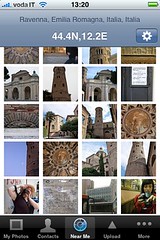
Back in June of 2008 we added the ability to perform radial queries in the photos.search API method. One of the earliest developers to use this feature was Frasier Speirs who used it for the Near Me feature of Darkslide, his Flickr application for the iPhone originally named Exposure.

It is difficult to overstate how impressive, and important, tools like Google Earth and PhotoSynth are visualizing geographies and in pushing the boundaries of what is possible both technically and conceptually. But both do so at the expense of what Scott McCloud calls “the magic in the gutter“. On the subject of the gutter, the space between the individual panels in a comic book, McCloud writes:

“From an axe-murderer pursuing a frightened man in one panel to an ambiguous shriek in the next, what happened? You killed a character in your mind. The artist did nothing of the sort. Closure is the work done by a reader which takes two juxtaposed images and unifies them into a single idea.”

That’s one of the things I like the most about “Near Me” and the ability to perform radial queries using the Flickr API: It affords a representation of place spun from a thicker, coarser, yarn. Less precise, maybe, but richer in its own way. With radial queries there is the knowledge that all the photos were taken close to one another — so close in some cases you can almost walk down a city block from one photo to the next — but the results are staggered, often overlapping one another, indoors and outdoors in time and space.

That staggering is the breathing room, the gutter, that lets viewers discover, imagine and create their own connections, their own closures, from not just a one history of a place but also the patterning of all those who’ve passed through it.

“Whether mapping lost lakes of a different era or tracing the edges of disappeared lagoons that still haunt the streets of San Francisco — or reminding urbanites of the sport-fishing possibilities beneath Manhattan — we are alive within laminations we will never fully map or comprehend.”

Geoff Manaugh

Earlier last week we enabled a quiet little feature that, hopefully, allows you to navigate some of that same mystery and serendipity in the 100 million geotagged photos on Flickr. We call it “nearby” and it is available for any geotagged photo on the site.

Nearby starts with a geotagged photo and then queries for other geotagged photos within a one kilometer radius. You can order the results by time and distance and interestingness but the important part is that they are photos, well, nearby to the photo you are looking at. Nearby is a deliberately fuzzy concept. Nearby in St. Peter’s Square in Rome might mean the person directly in front of you. Nearby in the streets of a small town might be the beautiful garden behind the fence and around the corner. Nearby encourages people to poke around and discover their surroundings, as though they were on foot and everything was just a short walk away.

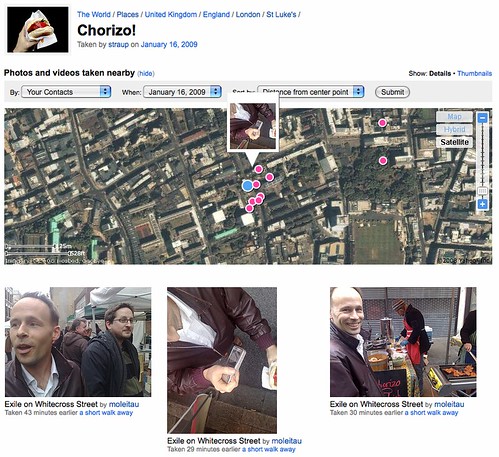
For example, I went to London recently and I while I was there the lovely crew at Dopplr took me around the corner from their offices to the Whitecross Street Market for lunch. We oggled the cheese and I had a chorizo sandwich and we all took lots of pictures. This is a picture of my sandwich and these are the photos taken nearby, including one of me taking a picture of my sandwich:
Nearby!

I have no idea what’s up with the creepy smile. I blame… the jet-lag.

If you look carefully at the screenshot above, you can see that I’ve defined “nearby” to mean only photos taken by my contacts on the same day and sorted by their distance from my delicious sandwich. This is a very specific and personal view and its value for me is as a record of a shared experience with friends. But if I strip away all the conditions and visit the default “nearby” page today I can see the snow that’s recently fallen on London and the graffiti that I walked passed, but didn’t photograph, in Shoreditch and Cal hanging out in the Moo/Dopplr offices.

I can watch the place around my photo grow up while also nosing around in the shoebox of its past and, at the same time, someone else can see that I ate a sandwich on Whitecross street.

The default search criteria for nearby is all photos taken in the last month sorted by date taken (most recent, first) but there are lots of different ways to define what nearby looks like using the available filters:

Who took a photo? (For the sake of brevity, “you” can also be taken to mean another photographer.)

  • Everyone
  • Everyone by you
  • Only you
  • Only your contacts

When was it taken?

  • In the last month
  • Today, you know today
  • The day that the photo was taken
  • All time

How should those photos be sorted?

  • Date taken
  • By distance from the center point
  • By interestingness

More sophisticated filters, like explicit date ranges, aren’t yet avaliable but we’re definitely thinking about them and we’d love to hear how people would like to use nearby.

The links for nearby pages are currently only available from the modal “map” dialog on individual photo pages or by URL hacking which is really just fancy talk for adding /nearby to the URL of any (geotagged) photo page.

Picture 1

Here’s a picture of another sandwich, this time a Philly Cheesesteak, taken in San Francisco’s Mission district:

http://www.flickr.com/photos/straup/3199232007/

And here are nearby photos:

http://www.flickr.com/photos/straup/3199232007/nearby

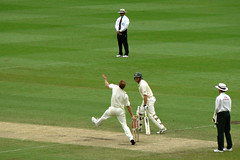
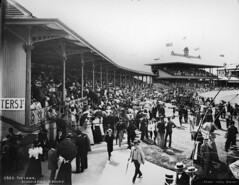
Or a photo of the Sydney Cricket Ground, from the Powerhouse Museum’s Collection, taken in 1900:

http://www.flickr.com/photos/powerhouse_museum/3022876525/

And photos taken nearby, on the very same grounds, 100 years later:

http://www.flickr.com/photos/powerhouse_museum/3022876525/nearby?taken=alltime&sort=distance

2005-06 Sydney Cricket Test 2

The Lawn, Association Ground (now Sydney Cricket Ground)


photos by Tyrrell Photographic Collection, Powerhouse Museum and brettm8

Just like that! Well okay, we added a couple query parameters (to that last link) which most people aren’t ever going to do but you get the idea.

We’ve also added a special page, which you can link to with any old latitude and longitude and and we’ll show you photos near that point. This isn’t a page that we expect people to visit directly (typing all those numbers in the location bar is pretty boring, really) but rather we hope that it will be used by third-party applications and devices which are location aware and can fire up a web browser.

For example, if I were wandering around the Metropolitan Museum of Art, in New York City:

http://www.flickr.com/nearby/40.779274,-73.963265

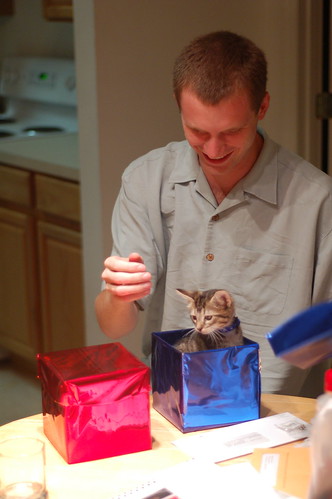
In the not so distant future, when web browsers are able to read your location using a GPS signal or wifi triangulation then [REDACTED BY KITTENS] but for now this is just a little something to bridge the difference and a hook for people to use in their applications.

In the Easter Egg department we’ve also added support for geohashes to the special “lat, lon” pages. The Wikipedia entry for geohashes describes them as “a hierarchical spatial data structure which subdivides space into buckets of grid shape … offering properties like arbitrary precision and the possibility of gradually removing characters from the end of the code to reduce its size (and gradually lose precision).” They’re also just short(er).

Picture 20

When hashed, 40.779274,-73.963265 becomes dr5ruzts7p8k which is all kinds of weird but that is true of all URL shortening services. Anyway, if the length of your URLs is an issue and the extra 8 characters are really going to make a difference you can sacrifice some of the built-in semantics in the longer version and use the following to link to the same photos from the Met:

http://www.flickr.com/nearby/dr5ruzts7p8k

Finally, during the time its taken me to write this blog post I came across the SnarkMarket blog and a piece quoting Ed Folsom’s account of Walt Whitman’s experience of “urban affection” which I think is a nice ribbon to wrap it all up with:

Whitman feels the power of the city of strangers. He’s looking at a city of strangers and how something we might now call urban affection begins to develop. How do you come to care for people that you have never seen before and that you may never see again?

Every day we encounter people, eyes make contact, we brush by people, physically come into contact with them, and may never see them again.

“If I were doing that activity that person would be me. If I were wandering the other way, rather than this way, that person could be me.”

ph-full

photos by Paul Hammond
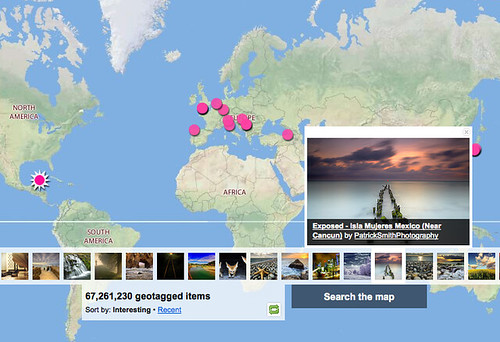
100,000,000 geotagged photos (plus)

Over the weekend we broke the Hundred Million geotagged photos, actually 100,868,302 at last count, mark. If we remember that we passed the 3 billion photos recently and round the figure down a little that means (does calculations on fingers) that around 3.333% of photos have geo data, or one in every 30 photos that get uploaded.

In the last two and a half years there have been roughly as many geotagged photos as the total photos upload to Flickr in its first two years of existence.

Of those, around two thirds have public geotags and can be searched for on the map or via the API, and about 33 million have some level of private geotags.

Flickr: Explore everyone's photos on a Map

I should probably mention at this point that if you go directly to the map and click the dots icon in the top right that you’ll see a smaller number.

This is because we added a rolling upload-date to the initial search to return the most interesting photos in the last month or so, rather than always have the same (all-time) photos show up forever, possibly reinforcing their interestingness.

Anyway, not bad really.

Posted in geo

5 Questions for Fraser Speirs

If you’ve been around Flickr for a bit then you’ve seen probably seen Fraser Speirs photos. If you’re a Mac user then you’ve almost certainly encountered his code. He built the Flickr Uploadr 2.0 for the Mac, and the hugely popular FlickrExport for direct uploading from iPhoto and Aperture. Lately his DarkSlide has brought Flickr browsing, discovery, and sharing to the iPhone.

Conundrum

1. What are you currently building that integrates with Flickr, or a past favorite that you think is cool, neat, popular and worth telling folks about? Or both.

Fraser:Most of the last year has been all about putting Flickr on the iPhone. I started back in March, when the first iPhone SDK was released, and cranked the code handle probably harder than I ever have before. Hours turned into days, days to weeks and weeks to months but Exposure was ready for day one of the App Store. It’s been rolling along steadily ever since, particularly with the recent 1.5 update and its cool new name – Darkslide.

near me function
The thing that I’ve most enjoyed seeing people get immense pleasure from in Darkslide is the Near Me feature. Near Me takes your iPhone’s current location and searches Flickr for photos near that point. People have found everything from great pubs nearby to, um, slightly compromising pictures of their neighbours.

2. What are the best tricks or tips you’ve learned working with the Flickr API?

Fraser:For anyone developing desktop or mobile applications against the Flickr API, you must, must, must do all your network operations asynchronously. Anything else produces a quite terrible user experience. Hint: UI animation can give you a few fractions of a second to make it feel faster to the user, and perceived speed is often more important than actual speed.

Brilliant Advice

Secondly, if you’re working on a mobile device, download thumbnails in parallel (though not so much as to make the servers cry). Early versions of Darkslide downloaded 75px thumbnails one at a time, and the network latency turned out to be about as long as the time taken to download a thumbnail. The experience was painful. Newer releases request about ten at a time, and the user experience is much improved. Beware latency!

3. As a Flickr developer what would you like to see Flickr do more of and why?

Fraser: I’d like to see some queries turned around a little faster. When you’re working on mobile devices, the user’s attention span is oftentimes quite short. Between a couple of seconds in network latency and a couple of seconds turnaround time on the query, then the download time for a chunk of XML, it can sometimes get a little sluggish.

API-wise, I really would like an API for group discussion threads. A good number of users ask me about Darkslide support for group discussions on a regular basis.

Finally, a plea to keep the mathematics of maps simple for mathematical dullards like myself. I know programmers are all supposed to be maths wizards, but I truly stink at maths. I love that flickr.photos.search can do a radial search around a point, rather than requiring me to compute a bounding box. It would be great if all maps-related API let us do this kind of thing. I’m still trying to get my head around the location corrections API :-)

4. What excites you about Flick and hacking? What do you think you’ll build next or would like someone else to build so you don’t have to?

Fraser: What excites me? Well, I love photography so I love making things that make it easier for me to look at great pictures. I love that Flickr is becoming the web’s de facto repository for photography, and I love helping to make that happen.

I’m also excited to see that the Twitter/Flickr axis is starting to turn into a very powerful tool in the hands of ordinary people. I’m writing this a couple of hours after US Airways flight 1549 went down in the Hudson River. Where did I get my first news and photos of this event? Not the BBC – who had nothing up at the time – but news from Twitter and photos from Flickr.

One of the first great photos of US1549 was taken by Twitter user jkrums and posted to TwitPic. It was later reposted to Flickr after TwitPic went down under the load. Maybe next time that will be an iPhone user using Darkslide and putting the photo on Flickr first.

This is power in the hands of ordinary people and, as a citizen of the world’s biggest surveillance society (one CCTV camera for every 14 people in the UK), I think it will be increasingly essential that citizens have this kind of global reach.

5. Besides your own, what Flickr projects and hacks do you use on a regular basis? Who should we interview next?

Sleepy

Fraser: I’m a big Twitter user and one simple-but-not-that-obvious thing I’ve done is to pipe my Flickr activity RSS feed into Twitter using TwitterFeed.com. I also write my blog with Daniel Jalkut’s MarsEdit blog editor, which has Flickr integration in its “Media” panel – this lets you drag and drop pictures from Flickr as HTML tags right into a blog post. Great timesaver. I also use Scout to see the occasional time that one of my photos makes it to Explore :-)

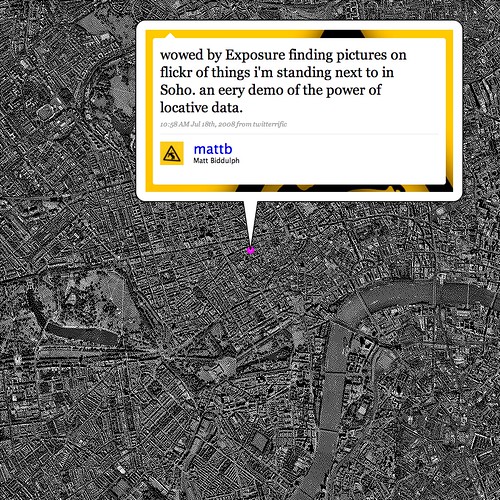
Whom should you interview next? I’d like to hear from Matt Biddulph at Dopplr. I’m very interested in where Flickr photos end up, and Dopplr are making interesting use of Flickr photos in the things they do, such as producing personal travel reports with CC-licensed Flickr photos.

5 Questions for Jonnie Hallman

If you reach way back into the dusty, distant corners of your mind, you might remember 2008. Its fading but there. And back in 2008, Jonnie Hallman was tapped as our next 5 questions interviewee. And what better way to kick off 2009, then with these great answers.

Adobe Design Achievement Awards portrait

Jonnie Hallman has built a cult following around his award winning desktop app, DestroyFlickr: “alternative view of Flickr”. He also recently turned his creative/destructive eye towards Twitter, with DestroyTwitter. Download them, taken for a spin, come back with your understanding altered.

On a sad note, Jonnie tapped Jonathan Harris as the next link in the interview chain, but I was totally unable to get in touch with him, so we’ll be kicking off a new chain soon.

But onward!

1. What are you currently building that integrates with Flickr, or a past favorite that you think is cool, neat, popular and worth telling folks about? Or both.

Jonnie: I’ve spent the past year or so working on an Adobe AIR app called DestroyFlickr. It takes an alternative approach to viewing Flickr content, focusing on the UI and its relationship to the photos. It actually began as a first-time experiment with both AIR and APIs in general. Prior to DestroyFlickr, I only had experience with programming websites, but quickly realized how much I prefer developing software—I like the idea of consistently improving a single project by adding new features and fixing bugs. The app uses a system of “workspaces” and “canvases” to organize the environment. Each user/contact has his/her own workspace with four canvases—“profile”, “photos”, “photo” and “contacts”. A user can switch between canvases easily and return to previous ones without reloading them.

DestroyFlickr - Photos canvas

In the beginning, I focused on features that felt obvious to me: a dark environment that’s easy on the eyes and beneficial to the photographs, the ability to flip through pages of photos in a matter of seconds, and the option to see a photo at a larger resolution without reloading it altogether. About six months into development, when DestroyFlickr started to get serious, I began implementing features that would really improve the average user’s workflow: the ability to present fullscreen, drag and drop downloading and uploading, and one-click download-all for easy backup. I originally abandoned DestroyFlickr after a few months because the only people using it were a handful of my friends who I actually had to persuade to use it. Learning of the Adobe Design Achievement Awards competition really saved it. I can’t thank them enough for all the attention DestroyFlickr has gotten since. It went from 28 users to over 6,000 in a little over a month. Now, it’s at about 7,500 and still going strong.

2. What are the best tricks or tips you’ve learned working with the Flickr API?

Jonnie: I think the most important thing to do before starting any Flickr project is to write a very simple and robust wrapper for calling methods. I use a “Method” class that has a single static function, “call”, which handles everything and returns a loader. By setting up an adaptive system, I was able to avoid hundreds of lines of redundant code. Regarding specific methods, the flickr.photos.search is certainly the APIs best kept secret. I’ve found it to be extremely useful on a number of levels and really wish the API had more methods like it.

3. As a Flickr developer what would you like to see Flickr do more of and why?

Jonnie: I’d like to see more parameters and methods for groups and contacts. I know contacts is a touchy subject since you run the risk of apps that add contacts by the thousands, but I think Flickr’s been on the ball with filtering out malicious keys. The majority of requests I get from users ask for features that can’t be written because the API is a bit limited in those parts. Overall, I find the API to be extremely generous, but there are a few essential areas that aren’t as open as others. Specifically, a parameter that’s missing is the number of times a photo has been called someone’s favorite. I’d also really like to be able to retrieve my API key stats.

DestroyFlickr - View All

4. What excites you about Flickr and hacking? What do you think you’ll build next or would like someone else to build so you don’t have to?

Jonnie:The endless possibilities excite me. Flickr provides such a cohesive and substantial API with both a testing ground and stat tracker. Regarding what’s next, I’m going to continue adding onto DestroyFlickr between work and school, so anything new will be piled on top. I have plans of adding a workspace for groups and possibly a canvas for sets, but I need to approach both with caution and make sure I have a solid plan before I start any writing. I thought about making a separate uploader or backup app, but I think I’d rather make DestroyFlickr an all-in-one.

DestroyFlickr - Drag and drop downloading

5. Besides your own, what Flickr projects and hacks do you use on a regular basis? Who should we interview next?

Jonnie:Prior to DestroyFlickr, I tried out just about every Flickr app listed on the site just to see what’s possible. What caught my eye, though dormant for about two years now, is Jonathan Harris’ Time Capsule. I’d love to see what he has to say about the API as it is now and how he’d improve upon it.

Bonus question: what’s up with the name “DestroyFlickr”?

Jonnie: DestroyFlickr’s name is based off my mantra, “Destroy Today,” meaning to make the most of each day by destroying it. I see destruction as a form of creation. DestroyFlickr is not out to literally destroy Flickr, but rather develop upon it and take advantage of what Flickr provides.

Living In the Donut Hole

video by origami madness

A long long time ago (2005) in a galaxy far far way (Vancouver) when we joined Yahoo! and moved FlickrHQ to the Bay Area all but one or two members of the team lived within ten square blocks of each other in San Francisco’s Mission District.

John Allspaw, a long-time resident of the Mission used to regale us with stories of one of the neighbourhood’s notable quirks commonly referred to as the “donut hole”: The rest of the city could be covered in fog, or raining, but the moment you crossed over in the Mission the sky would open up and the entire neighbourhood would be bathed in sunshine.

When John and George Oates and I used to car pool between the city and the offices in Sunnyvale, we would drive up and down highway 280 and sure enough as you approached the city, at the end of the day, you would drive into an enormous blanket of fog the moment we passed the airport in Millbrae. And as soon as we’d pulled off the San Jose exit there would be an open stretch of clear sky all the way to Civic Center where it would stop again just as suddenly.

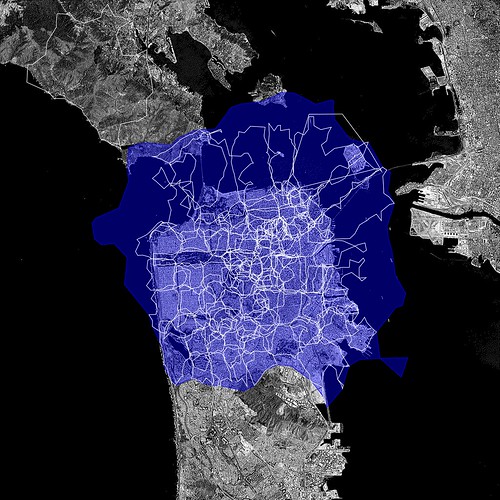
Some mornings, when I look out my kitchen window at the clouds hanging over Diamond Heights I like to pretend I can see the curvature of the inside of the donut hole itself. I was reminded of all this the other morning when I was generating some visualizations based on the shapefiles that are derived from the almost 100 million geotagged photos on Flickr.

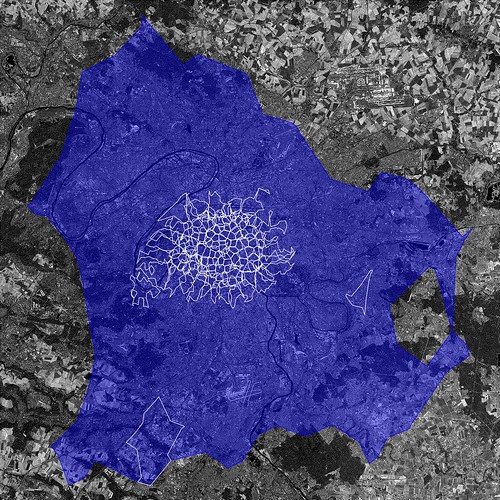
Paris (Ile-de-France)

The larger, blue, contour is the “shape” of the city of Paris (or WOE ID 615702) according to Flickr. The smaller white contours are the child neighbourhoods of that WOE ID with public, geotagged photos. So, what’s going on then?

The first outline maps roughly to the extremities of the RER, the communter train that services Paris and the surrounding suburbs. This is a fairly accurate representation of the “greater metropolitain” area of Paris. Metropolitain areas, increasingly common in both popular folklore and government administrivia as more and more people shift from rural to urban living , are noticeably lacking from the Flickr hierarchy of place types and a subject probably best left for another blog post.

Untitled #1202166719

The rest, taken as a whole, follow closer to the shape of the old city gates that most people think of when asked to imagine Paris. Which one is right? Well, both obviously!

Cities long ago stopped being defined by the walls that surround(ed) them. There is probably no better place in the world to see this than Barcelona which first burst out of its Old City with the construction of the Eixample at the end of the 19th century and then again, after the wars, pushed further out towards the hills and rivers that surround it.

There are lots of reasons to criticize urban sprawl as a phenomenon but sprawl, too, is still made of people who over time inherit, share and shape the history and geography they live in. Whether it’s Paris, Los Angeles, William Gibson’s dystopic “Boston-Atlanta Metropolitain Axis” (BAMA) or the San Francisco “Bay Area” they all encompass wildly different communities who, in spite of the grievances harboured towards one another, often feel as much of a connection to the larger whole as they do to whatever neighbourhood, suburb or village they spend their days and nights in.

ORY

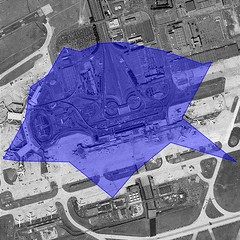
That’s one reason I think it’s so interesting to look at the shape of cities and see how they spill out beyond the boundaries of traditional maps and travel guides. In the example above the shape for Paris completely engulfs the commune of Orly, 20 kilometers to the South of central Paris, which makes a certain amount of sense.

It also contains Orly airport which isn’t that notable except that we treat airports as though they were cities in their own right because the realities of contemporary travel mean that airports have evolved from being simple gateways to captial-P places with their own culture, norms and gravity. So, now you have cities contained within cities which most people would tell you are just neighbourhoods.

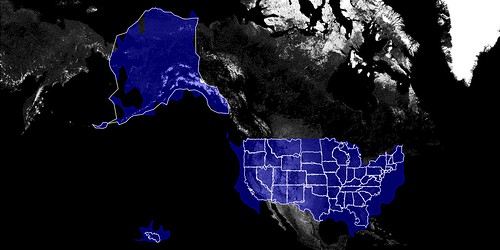
We’re recently finished rendering the second batch of shapefiles and looking ahead I am wondering whether we should also be rendering shapes based on the relationship of one place to another. Rendering the shape of the child places for a city or a country (you can do this using the handy, if awkwardly named, flickr.places.getChildrenWithPhotosPublic API method) would allow you to see a city’s “center” but also provide a way to filter out parts of a shape with low Earthiness (aka water).

Americonia

The issue is not to prevent, or correct, shapes that provide a “false” view because I don’t think they do. As Schuyler observed, while we were getting all this stuff to work in the first place, and testing the neighbourhoods that meet San Francisco Bay they are really the shapes of people looking at the city. They are each different, but the same.

But maybe we should also map the neighbourhoods that aren’t considered the immediate children of a city but which overlap its boundaries. What if you could call an API method to return the list or the shape of a place’s “cousins”? What could that tell us about a place?

San Francisco

What does all of this have to do with donuts? Nothing really, but it’s a nice way to think about the problem and since we have a long and storied tradition of silly names for projects I imagine this one will stick too.

There are no fixed dates yet for when, or whether, any of this will make its way in to the API but quite a lot of it could be done with API methods already available today. One change we have made is to add a new flickr.places.getShapeHistory API method which include pointers to all the shapefiles that have been rendered for a place. I have dim and distant memories of possible reasons why not to do this, in the past, but the exercise in making donut shapes makes me think I was wrong. The more data and “nubby bits” that people have to work with the more interesting it will be for everyone.

Enjoy!

Front-end Performance: Doing More With Less

In a recent talk on ajax performance, Douglas Crockford explained the practice of “streamlining” code as including algorithm replacement, work avoidance and code removal.

Applying this to page load time and performance, browser “work” can be avoided by reducing the number of HTTP requests made. In the most common case this can mean eliminating images entirely from a design, or reducing multiple image references to a single sprite image where possible. Shaving off image requests is a wonderful way to incrementally improve both perceived and measured performance.

The use of sprites alone is not a new technique, but the approach taken in this case involves a low-cost, low-risk update to a common component based on legacy code, reduces the number of HTTP requests and simultaneously improves the UI – all good things!

Legacy code: The good and the bad

Flickr has UI components and widgets which have worked well for years, but can also benefit from newer development techniques such as sprite-based images. Rounded-corner dialogs including alpha-transparent drop-shadows are two prime examples, obvious subjects for optimization. There is some risk in modifying code which may be used in hundreds of places, so minimizing changes to the HTML structure is important.

In this particular case, legacy table-based code was used to do layout for a rounded-corner dialog, and a separate table element was used to position a drop-shadow underneath it. Both elements used separate images for each edge of the box, resulting in eight HTTP requests for the dialog and another eight for the shadow.

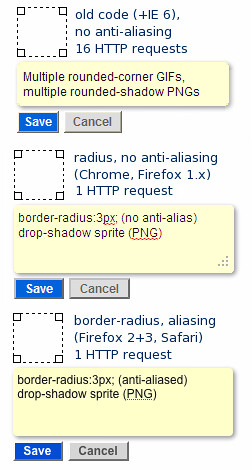
Screenshot: Saving HTTP requests with CSS and sprites

Dialog and drop shadow performance optimizations (border-radius + CSS sprites) save up to 15 HTTP requests, in this example (adding a note to a photo on Flickr.)

Retrofitting legacy code in a low-risk way

In modifying the drop-shadow code while maintaining backwards-compatibility, the src property of each corner image was set to a transparent 1×1 GIF image; width and height were already specified on these elements, so the layout is retained as if the original image were being used. Additionally, a CSS class applied the sprite as a background image and a second class provided the background-position offset.

For the rounded corner dialogs, eight image requests were completely eliminated for browsers supporting CSS’ border-radius property. Additionally, the rounded corners are now anti-aliased in several browsers – a further improvement over the old GIF-based “jaggies.”

While not as “clean” as a complete code rewrite, this incremental approach improved performance and did so with minimal chance of introducing bugs in a global component.

Related resources

Some helpful, free tools were used in creating both the sprite and CSS for these performance tweaks.

  • Smushit.com
    Web-based image optimizer, shave (potentially many) bytes off GIF/PNG images
  • CSS sprite generator
    Upload a .zip of images, set some parameters, and get a sprite with the CSS generated automagically! Quite handy.

Pancake Friday

This one goes out to all the other developers that drag themselves into the office on the second day of the year just before a weekend (and those online over the holidays, just incase).

For the record we are going to Rock 2009 and talk about it here, but first time to grab breakfast.

Photo from keithdavisyoung.